Murf AI Review 2026: A Practical Guide to Text to Speech, Pricing, and Real Use Cases

Murf AI in one minute
Murf AI is not just a single text-to-speech tool. It is a broader AI voice platform that includes Murf Studio for voiceovers, Gen2 and Falcon models for API-based speech generation, AI dubbing, voice cloning, and Murf Reader for read-aloud publishing workflows. For most users, the more important question is not “Does Murf have AI voices?” but “Which Murf product actually fits my workflow?” That matters because AI voice platforms are no longer competing on novelty alone. Buyers now care just as much about editing flexibility, integrations, collaboration, and production speed. Global Market Insights estimated the text-to-speech market at US$4.8 billion in 2025, with projections reaching US$35.3 billion by 2035, while Wyzowl’s 2026 survey found that 91% of businesses already use video marketing and 63% use AI-powered video tools.
Based on hands-on testing and Murf’s official documentation, the platform works especially well for training content, presentations, explainers, product demos, and multilingual voiceover workflows. It is less convincing for buyers focused mainly on highly emotional narration or the simplest API-first experience. One thing worth noting is that Murf lists different voice and language totals across Studio, API, and support pages. Those differences usually reflect separate products and models, but many reviews repeat the numbers without explaining the context behind them.
What Murf AI actually includes
For most users, Murf Studio is the main product. Murf describes it as a web-based text-to-speech editor for turning scripts, documents, books, and webpages into voiceovers. According to the company’s official TTS page, Studio includes 200+ AI voices across 35+ languages, multiple accents, and controls for pitch, speed, pauses, pronunciation, tone, and emphasis. The platform is mainly aimed at training videos, presentations, explainers, product demos, accessibility workflows, and general business content.
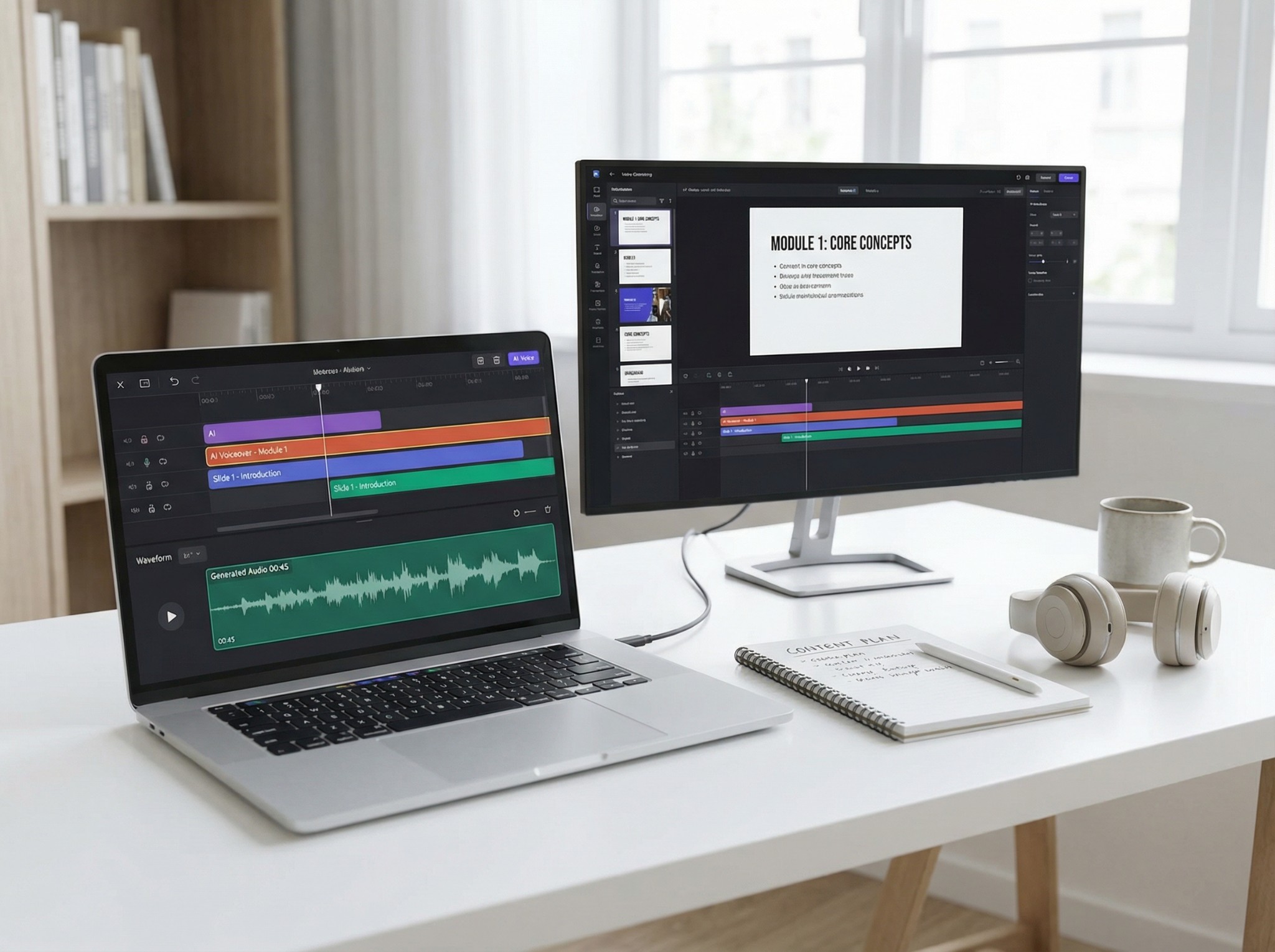
What makes Murf stand out from many simpler text-to-speech tools is its focus on workflow rather than just voice generation. Instead of functioning like a basic “paste text and download audio” generator, Murf feels more like a lightweight production editor where users can organize projects, split scripts into blocks, preview changes, manage revisions, and collaborate inside the same interface. That workflow focus also shows up clearly in the hands-on walkthrough used for this review, where most of the testing revolves around editing, voice filtering, pacing adjustments, previews, and exports rather than chasing the single most realistic AI voice.
Gen2 and Falcon
For developers and API-focused teams, Murf separates its text-to-speech infrastructure into two main model families: Gen2 and Falcon. According to Murf’s API documentation, the platform currently offers 150+ AI voices across 35 languages and more than 20 speaking styles. Falcon is positioned for low-latency applications such as conversational AI, live assistants, and voice agents, while Gen2 focuses more heavily on voice quality, customization, and studio-style control.
Murf describes Falcon as an ultra-fast streaming TTS model with sub-130 ms response times, while Gen2 is presented as a more customizable model trained on over 70,000 hours of professional voice recordings. Murf also claims high pronunciation accuracy compared against providers such as AWS, Azure, Google, OpenAI, and ElevenLabs. Those figures are useful for understanding how Murf positions its technology, but they are still vendor-provided benchmarks rather than independent academic testing.
Murf’s Dubbing, Reader, API, and Voice Cloning Tools
Murf’s broader product ecosystem is worth understanding because many reviews simplify everything into a single “Murf AI” label, even though the platform actually includes several separate tools aimed at different workflows. Murf Dubbing focuses on multilingual audio and video localization, with support for 40+ languages, while Murf Reader is designed for publishers and websites that want to turn written articles into listenable audio. The company also offers a separate API ecosystem with its own free trial limits, plus custom voice cloning that typically requires less than 90 minutes of clean recordings and can take several weeks to process.
This distinction matters because the right Murf product depends heavily on the workflow itself. If your goal is narrated presentations, explainers, or training videos, Murf Studio is the main product to evaluate. If you are building voice agents or conversational AI systems, Falcon matters more. If multilingual localization is the priority, Dubbing becomes much more relevant. One of Murf’s biggest strengths is that all of these workflows exist inside the same ecosystem. At the same time, that also explains why pricing details, voice counts, and feature comparisons can sometimes feel fragmented across the company’s public pages.
Hands-on test and how to use Murf AI
One thing the walkthrough video does well is show what Murf actually feels like to use. Instead of repeating marketing claims, the reviewer signs up, explores the dashboard, uploads scripts, previews voices, generates audio, and runs into some of the platform’s limitations firsthand. The setup process itself looks straightforward: sign in with Google, enter the Studio dashboard, upload a TXT script, and start generating audio within minutes.
One of the first things visible inside the account is the free-plan limit:
“I’m on the free plan, and I can see 10 minutes of voice generation and 10 minutes of transcribing.”
That lines up with Murf’s current free-trial offering, which includes 10 minutes of voice generation, 10 minutes of transcription, premium voice access, and no downloads on the free tier.
The workflow feels more polished than many lightweight TTS tools, especially when handling longer scripts. The reviewer uploads a TXT file, splits the script into sentence blocks, previews sections individually, and tests export options. The biggest limitation appears during export testing, where generated audio can be previewed but not downloaded without a paid plan. Another interesting detail is that Murf slightly exceeded the visible free quota before blocking additional generation, although the company officially describes the free allowance as a one-time credit rather than a flexible overage system.
How to use Murf AI text to speech step by step
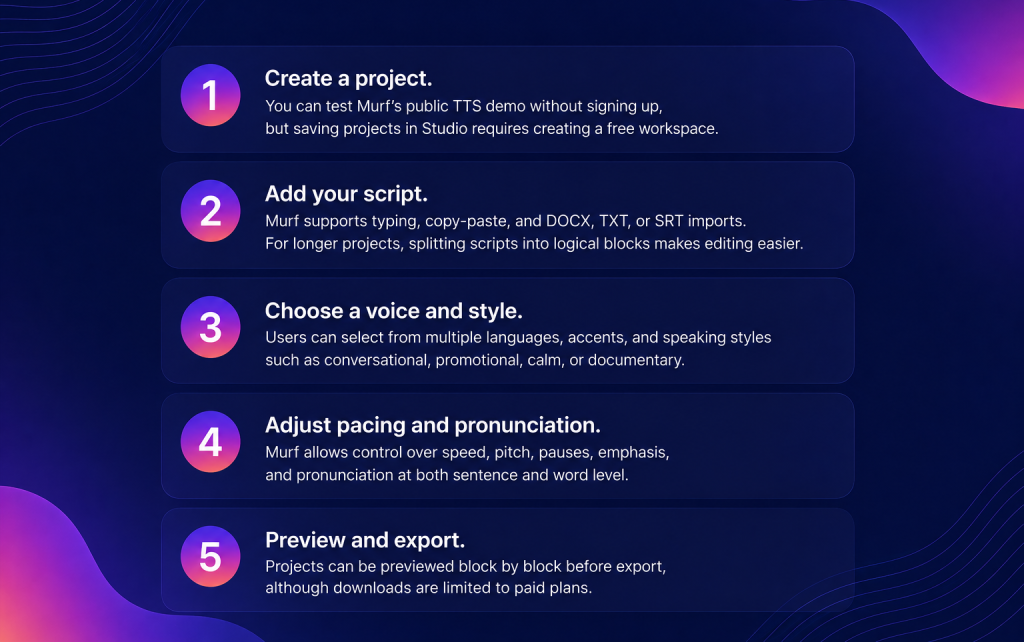
One practical detail many buyers miss is how Murf handles Voice Generation Time (VGT). Changing the voice, speaking style, pauses, pitch, or pronunciation does not use extra credits as long as the text stays the same. Additional VGT is only used when the actual script changes and the section must be re-rendered.
Murf AI features, pricing, and buyer fit
Murf markets itself heavily around realistic AI voices, but in practice, the more important strengths are editing flexibility, workflow tools, integrations, and enterprise readiness. On its benchmark pages, Murf claims 99.38% pronunciation accuracy and says its models were trained on more than 70,000 hours of professional voice recordings, with comparisons against providers such as AWS, Azure, ElevenLabs, Google, and OpenAI. Those figures are still vendor-provided benchmarks rather than independent academic testing, but they help explain how Murf positions its technology.
One area where Murf stands out more clearly is voice ethics and business trust. The company says it works with professional voice actors, requires explicit consent for voice creation, pays royalties for voice avatars, and does not use enterprise customer data to train models. For companies handling internal training, branded content, or sensitive information, those policies matter more than marketing claims about “human-like voices.”
Integrations are another practical strength. Murf supports tools such as PowerPoint, Canva, Adobe Captivate, Adobe Audition, Zapier, Make, and n8n, making it easier to fit into existing presentation, training, and automation workflows. On the enterprise side, Murf also references TLS 1.2+ encryption, SOC 2 Type II, ISO 27001, GDPR/CCPA alignment, and regional data-processing support for Falcon deployments, giving it a more business-ready profile than many creator-focused AI voice tools.
Murf AI pricing and free-trial reality
Murf’s free trial is useful for testing the platform, but it is intentionally limited. New users currently get access to premium voices, Studio features, 10 minutes of voice generation, 10 minutes of transcription, and shareable previews. What the free trial does not include is downloads, since exporting audio requires a paid plan. Another important detail is that the free allowance is not monthly. The 10-minute limit is a one-time credit tied to the account, and the trial ends once those minutes are exhausted.
Paid workspace limits depend on the subscription tier. At the time of writing, Murf’s help documentation references Creator, Growth, Business, and Enterprise plans, although naming and pricing structures are not always perfectly synchronized across pricing and support pages. That does not necessarily mean the information is incorrect, but it does mean buyers should verify the live pricing page before subscribing, especially if project limits or voice-generation quotas are important to their workflow.
One practical way to evaluate Murf’s pricing is through actual script output. Murf estimates that a 1,000-word English script consumes roughly 6 minutes of voice generation time. Based on that estimate:
- the free workspace covers roughly 1,600–1,700 words,
- Creator-level plans support around 20,000 words monthly,
- while larger business tiers scale significantly higher.
These are still rough estimates because speaking speed, edits, and re-rendering affect final usage. Murf’s API pricing works differently from Studio pricing, using character-based billing instead of voice-generation hours.
Pros, cons, and where Murf falls short
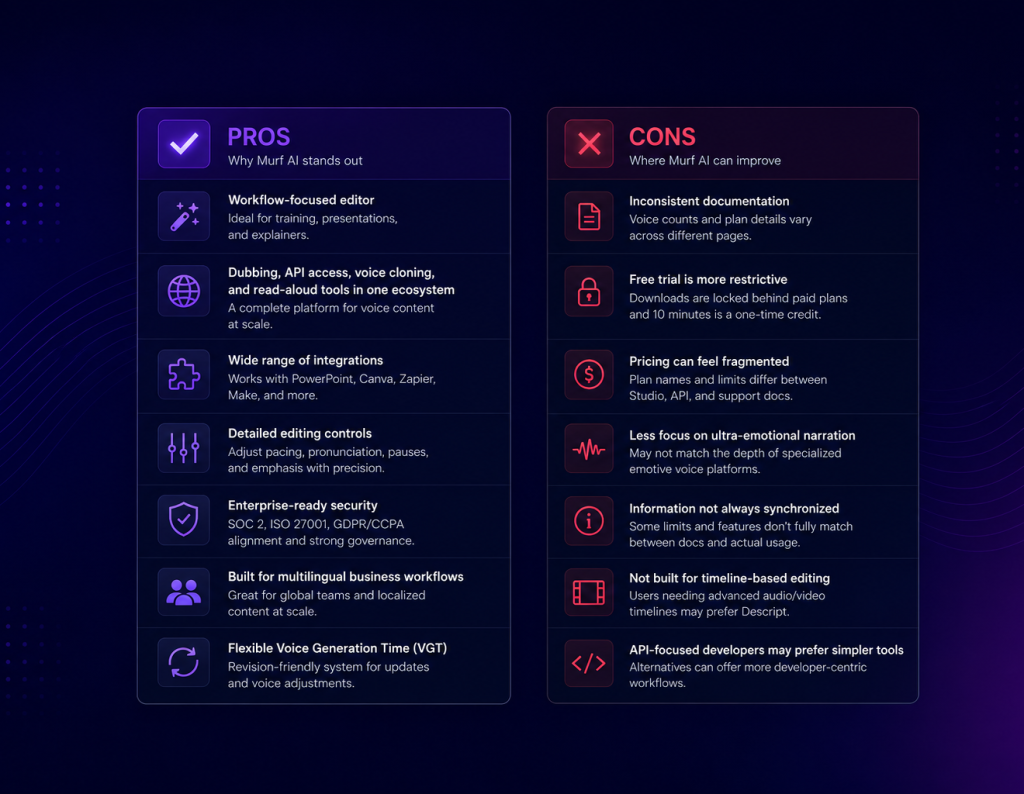
Buyers looking for ultra-emotional narration, massive consumer voice libraries, or timeline-based editing workflows may prefer alternatives like ElevenLabs or Descript.
Murf AI vs alternatives
The biggest difference between Murf and ElevenLabs comes down to positioning. ElevenLabs focuses heavily on voice models, large voice libraries, AI agents, and developer-oriented workflows. Murf approaches the market more as a production platform built around structured voiceover workflows, collaboration, presentations, training content, and enterprise integrations. In practice, ElevenLabs feels more voice-model-focused, while Murf feels more workflow-focused. For a broader comparison of leading platforms in this space, see our guide to the best text-to-speech tools in 2026.
Descript targets a different category almost entirely. Its core strength is editing recorded audio and video as if they were text documents, with tools for transcription, podcast editing, filler-word cleanup, screen recording, and post-production. Murf is stronger when AI voice generation itself is the main task, while Descript is stronger for creator-heavy editing workflows built around recorded media.
The comparison with WellSaid and Speechify Studio is narrower. WellSaid focuses more heavily on polished team voiceovers and licensed voice data. Speechify emphasizes large voice catalogs, accessibility, and dubbing workflows. Murf’s advantage is less about headline voice counts and more about its broader ecosystem. The platform combines Studio editing, API access, dubbing, workflow integrations, enterprise documentation, and collaboration tools inside one platform.
Is Murf AI worth it?
Yes — for the right workflow, Murf AI is worth considering. The platform works especially well for training videos, presentations, explainers, onboarding, multilingual content, and recurring business voiceovers. Its biggest strength is not just voice quality. Murf also offers mature editing controls, integrations, collaboration tools, dubbing support, and enterprise-ready documentation. Its biggest weakness is consistency across public-facing information. Voice counts, plan names, and workspace limits are not always presented identically across pricing and support pages. Still, if your workflow depends on repeatable business voiceovers rather than one-off content, Murf is one of the more complete AI voice platforms currently available.
FAQ
- What can Murf AI be used for?
Users can create AI voiceovers with Murf AI for videos, presentations, training content, explainers, and business media. It also includes dubbing, voice cloning, and API tools.
- Is Murf AI free?
Murf offers a free trial with limited voice generation and transcription minutes, but downloads require a paid plan.
- Does the free trial reset every month?
No. The free trial includes a one-time 10-minute voice-generation allowance.
- Can I download audio on the free plan?
No. Audio exports and downloads are only available on paid plans.
- How many voices and languages does Murf have?
It depends on the product. Murf currently references 200+ Studio voices, 300+ trial voices, and 150+ API voices across 33–35+ languages.
- What file types can I import into Murf Studio?
Murf supports DOCX, TXT, and SRT imports, alongside direct text input.
- Does Murf support audio-to-text?
Yes, but only on Growth, Business, and Enterprise plans. It supports MP3 and MP4 uploads.
- Does Murf offer commercial rights?
Yes. Paid Studio plans include commercial rights for exported voiceovers.
- How secure is Murf for business use?
Murf references SOC 2 Type II, ISO 27001, GDPR/CCPA alignment, TLS 1.2+ encryption, and regional data residency support.
- How accurate is Murf’s pronunciation?
Murf claims 99.38% pronunciation accuracy in its internal benchmark testing.
- How much text can I create with the free trial?
Based on Murf’s estimates, the 10-minute free trial covers roughly 1,600–1,700 English words.
- What happens after I cancel?
Commercial rights remain valid after cancellation, although projects exceeding free-plan limits may become locked.