Text2Speech.org Review 2026: Free Unlimited TTS, Real Limitations, and Who It’s Actually For
Text2Speech.org is a free online text-to-speech converter that allows users to paste text, generate synthetic speech, and download the result as an audio file. Unlike many modern AI voice platforms, the service does not require registration, subscriptions, credits, or usage payments. The platform positions itself as a completely free TTS solution, including for commercial usage.
That simplicity is also its biggest limitation. In 2026, the Text-to-Speech market is increasingly dominated by neural AI voice systems capable of realistic narration, multilingual speech generation, voice cloning, OCR workflows, and conversational delivery. Compared with those platforms, Text2Speech.org operates at the opposite end of the market as a lightweight, browser-based, and highly minimal tool focused only on basic speech generation.
This article explores how Text2Speech.org works, what features it actually offers, where it performs well, where it falls behind modern AI TTS platforms, and which users it realistically serves today.
What Is Text2Speech.org?
Text2Speech.org is a browser-based Text-to-Speech platform that converts written text into downloadable speech audio. The workflow is extremely simple: users paste text into the input box, select a voice, choose the playback speed, generate the audio, and download the result as either an MP3 or WAV file. The platform focuses on fast and straightforward speech generation without requiring technical setup or account creation.
One of the platform’s main selling points is accessibility. Text2Speech.org emphasizes completely free access, unlimited usage, and no registration requirements, making it easy for users to generate speech instantly from any browser. Unlike many modern AI TTS platforms, there are no subscriptions, credits, dashboards, or usage tiers involved in the process.
However, Text2Speech.org also operates very differently from modern AI voice platforms. It does not position itself as an AI productivity tool, a voice cloning platform, or a professional creator solution. Instead, it functions primarily as a lightweight utility designed for quick and basic text-to-speech generation.
How Text2Speech.org Works
Text2Speech.org uses a traditional browser-based Text-to-Speech workflow focused on simplicity and speed. Users can manually paste text into the editor, choose from the available voices, adjust the speaking speed, and generate audio directly in the browser. The platform currently supports both MP3 and WAV downloads, along with basic playback controls and several accent variations.
The interface itself is extremely minimal compared with modern AI TTS platforms. There are no dashboards, creator workspaces, projects, voice studios, AI editing tools, or account management systems. Everything is designed around quick one-time speech generation rather than long-term workflows or advanced content production.
This simplicity makes Text2Speech.org fast and easy to use, especially for users who want instant text-to-audio conversion without signup requirements. However, it also significantly limits the platform’s functionality compared with newer AI voice platforms that offer OCR, voice cloning, multilingual narration, creator workflows, and advanced speech customization.
Languages and Voice Selection
Text2Speech.org currently offers very limited language support compared with modern AI TTS platforms. According to the transcript testing, the platform mainly supports English voices along with a small selection of Indian language variants. The English options include Female US, Male US, a Scottish accent voice, and a lower-quality compact voice, while Indian language support appears limited to Female Hindi and Male Marathi voices.
This is significantly below the capabilities of modern AI voice platforms, many of which now support 40–100+ languages, regional accents, multilingual narration, and more natural conversational speech generation. The transcript also noted that while the platform interface itself could be translated into languages like Spanish and Dutch, this did not expand the actual voice or language availability offered by the TTS system.
Where Text2Speech.org Falls Behind in Modern AI TTS Platforms
The biggest gap between Text2Speech.org and modern AI TTS tools is not just voice realism, but overall workflow functionality. The platform lacks many features that have become standard in newer AI voice platforms, including OCR support, PDF and DOCX uploads, voice cloning, AI pronunciation editing, creator workspaces, developer APIs, and AI-powered productivity features like summaries or document assistance.
The platform currently functions mostly as a simple text box, voice selector, and download tool. While this makes it fast and easy to use for quick speech generation, it also limits its usefulness for accessibility-heavy workflows, content production, audiobook creation, and professional narration.
Commercial Usage: Free but Unclear
One of Text2Speech.org’s biggest selling points is that generated speech can supposedly be used freely, including for commercial purposes. However, the transcript analysis did not identify detailed licensing documentation, creator agreements, or formal commercial protection terms. This creates some uncertainty for businesses, agencies, YouTube creators, and commercial publishers that may require clearer legal protection for generated audio content.
Modern AI voice platforms usually provide explicit creator licensing, commercial subscription plans, and legal documentation that explains how generated content can be used. Compared with those platforms, Text2Speech.org appears much more informal in this area. That does not necessarily mean the platform’s commercial-use claims are false, but it does suggest that the legal structure is less transparent than what is typically offered by professional AI voice platforms.
Text2Speech.org Pros and Cons
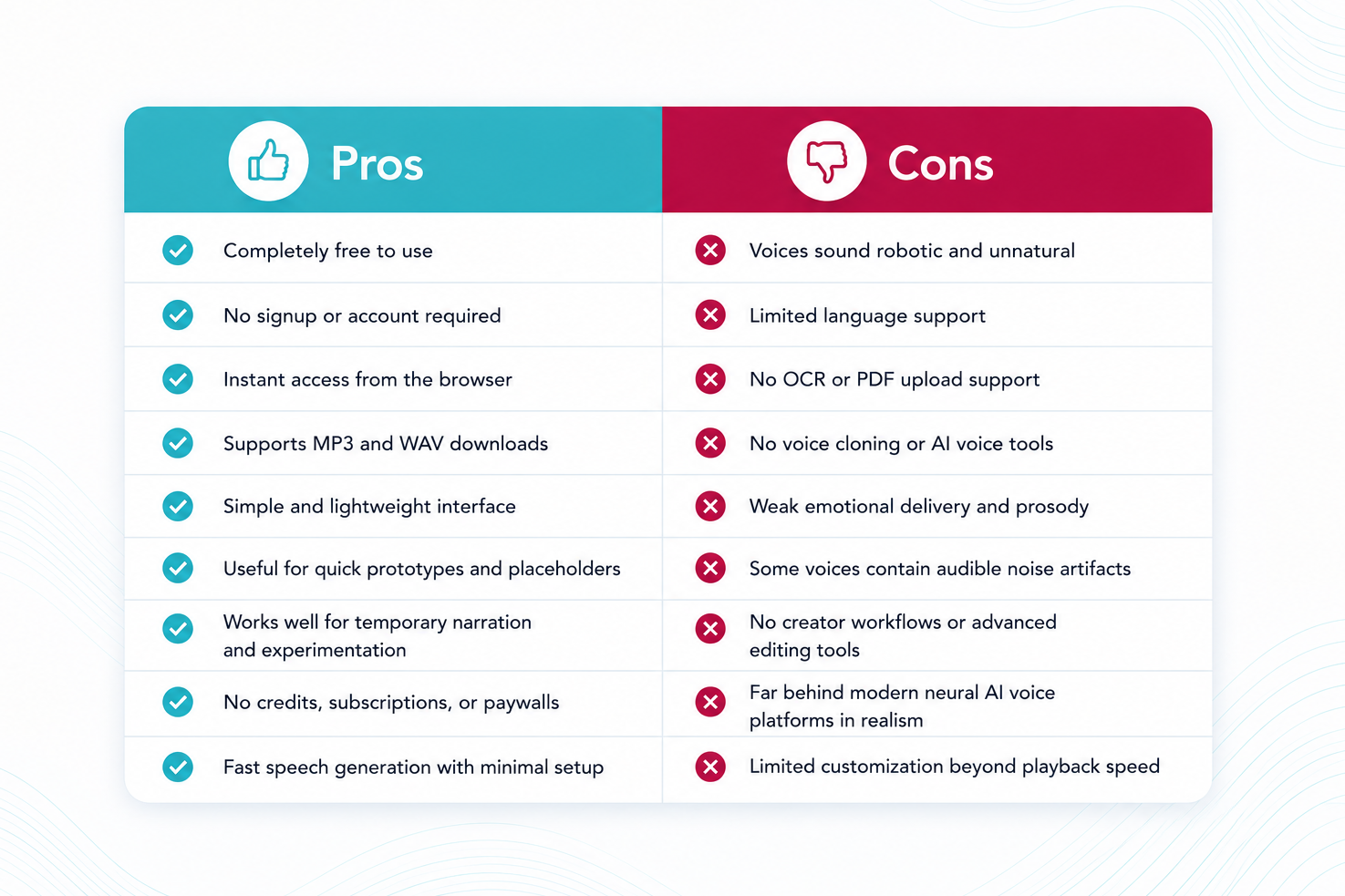
Like most free text-to-speech tools, Text2Speech.org comes with a mix of practical advantages and noticeable limitations. Here is a quick overview of where the platform performs well and where it falls behind modern AI TTS solutions.
Where Modern AI TTS Platforms Perform Better
Modern AI TTS platforms now compete primarily on voice realism, accessibility, multilingual support, creator workflows, and conversational delivery. Platforms like Speechify focus heavily on OCR, synchronized reading, accessibility features, AI summaries, and productivity-oriented listening workflows. Production-focused platforms such as ElevenLabs and Murf prioritize realistic narration, voice cloning, dubbing, and creator-quality speech generation, while newer AI-native tools continue to push voice quality and workflow automation further.
For readers comparing the broader market, our guide to the best text-to-speech tools in 2026 provides a detailed comparison of the leading AI voice platforms and their strengths. Compared with these systems, Text2Speech.org functions more like a lightweight utility tool than a modern AI voice ecosystem.
Is Text2Speech.org Worth It?
Text2Speech.org is worth it if you need a completely free and simple way to generate speech audio without creating an account. The platform is fast, lightweight, and easy to use, making it useful for quick experiments, placeholders, temporary narration, and simple projects. However, it also reflects the limitations of older-generation TTS technology, with robotic voices, limited language support, no OCR or file uploads, and no advanced AI voice features. For professional voiceovers, audiobooks, polished YouTube content, or accessibility-heavy workflows, modern AI TTS platforms perform significantly better, but for free instant text-to-speech generation, Text2Speech.org still fills a practical niche in the market.
FAQ
- Is Text2Speech.org free?
Yes. The platform is completely free to use.
- Does Text2Speech.org require signup?
No. You can use it instantly without creating an account.
- How many voices does Text2Speech.org have?
It offers around 4 English voices and 2 Indian-language voices.
- Does Text2Speech.org sound realistic?
No. The voices sound robotic compared with modern AI TTS platforms.
- Which voice sounded best in testing?
The Scottish voice and one lower-quality compact voice sounded cleaner than the default Male US voice.
- Can Text2Speech.org read PDFs?
No. It only supports pasted text.
- Does Text2Speech.org support OCR?
No. It cannot scan images or documents.
- Which file formats can you download?
You can download audio as MP3 or WAV
- Does Text2Speech.org support voice cloning?
No. The platform does not offer voice cloning features.
- Can you use Text2Speech.org commercially?
The site claims commercial use is allowed, but detailed licensing terms are unclear.
- Is Text2Speech.org good for YouTube videos?
Only for simple or temporary projects. The audio quality is not ideal for professional content.
- Which languages does Text2Speech.org support?
Mainly English plus limited Hindi and Marathi support.
- Does slower speed improve the voices?
Not much. The voices still sound robotic even at slower speeds.
- What is Text2Speech.org best for?
It works best for quick audio generation, placeholders, testing, and simple projects.
- What are the biggest downsides?
The main limitations are robotic voices, limited language support, no OCR, no file uploads, and no AI voice features.