The Best Text-to-Speech Tools in 2026: A Comprehensive Overview and Comparison
The TTS market is growing fast — valued at around $5.7 billion in 2026 and expanding at roughly 22% per year, according to Mordor Intelligence. But the numbers only tell part of the story. That growth is being driven by many different use cases, including accessibility, multilingual content, podcasts, video creation, call centers, gaming, and e-learning. The result is a market that has splintered into tools built for completely different kinds of users.
This article explores ten of the most popular TTS platforms available today, including their features, pricing, strengths, and limitations. For video walkthroughs of each tool, see the reviews on The Speakr YouTube channel.
The Market: What’s Changing in 2026
Not long ago, TTS basically meant a robotic voice that made it obvious you were listening to a machine. That’s changed dramatically. Modern TTS models now sound surprisingly human.
The biggest improvement is response speed. Most platforms respond within 75–150 milliseconds, making real-time conversations possible.
The other big shift is emotion. It used to be that you picked a voice and got a voice. Now platforms let you dial in tone, pace, and emotional character — warm, authoritative, excited, hesitant. That opens entirely new possibilities, from interactive game characters to AI companions and more natural customer support.
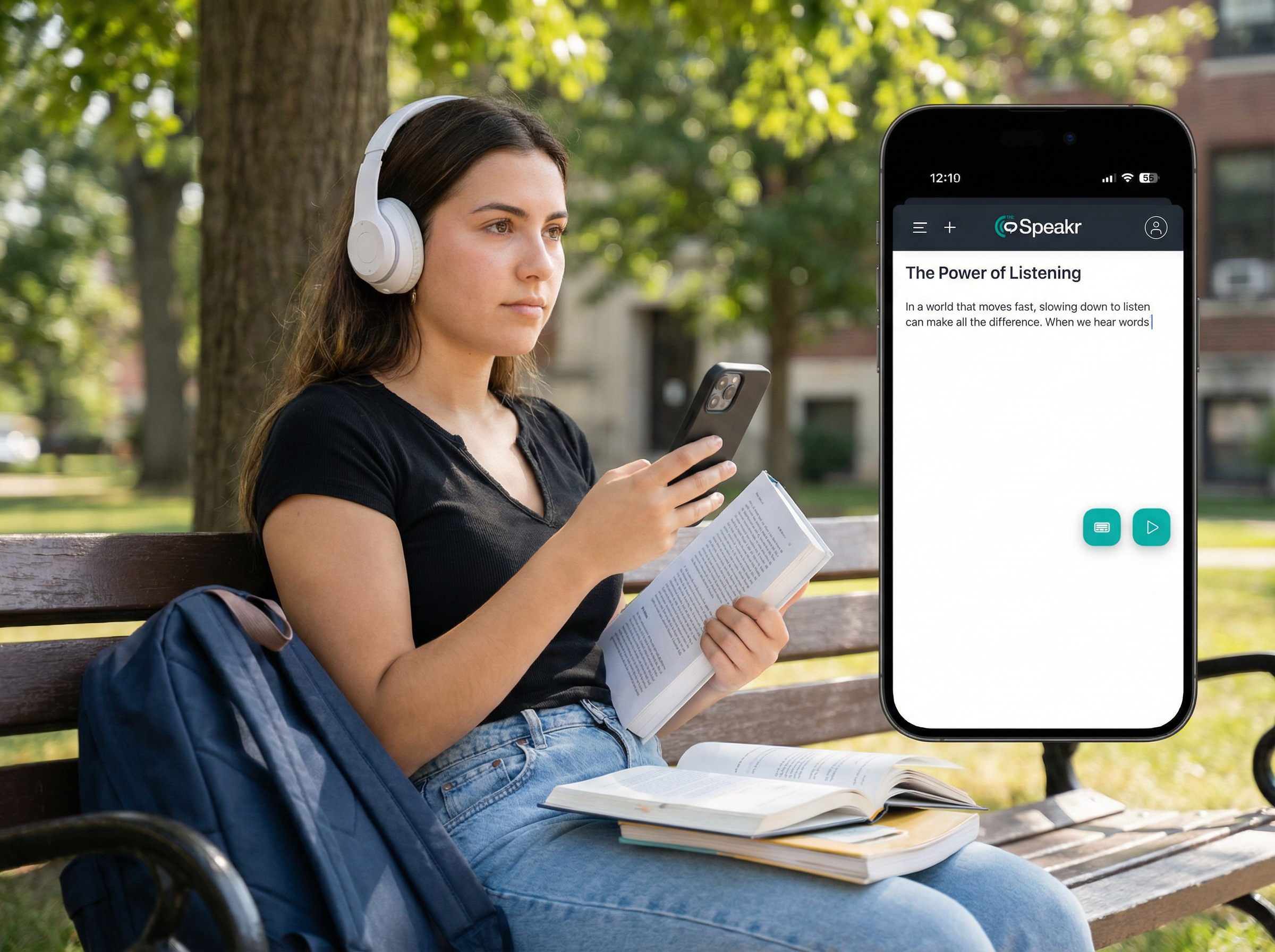
And then there’s who’s using it. A few years ago, TTS was largely a niche tool. Today, lightweight browser-based tools with generous free plans make TTS accessible to students, researchers, people with dyslexia, and everyday users. The technology didn’t just get better — it became accessible to people who actually needed it most.
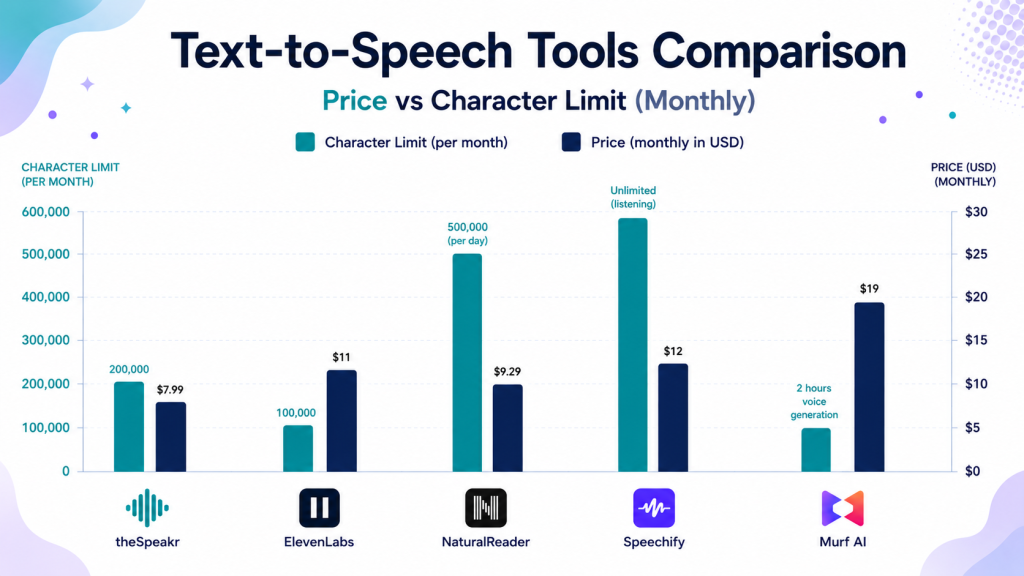
This chart compares the starting paid plans of popular text-to-speech platforms by monthly price and character limits. It highlights how differently these tools approach pricing — some focus on unlimited listening, others on character-based generation, and some on professional voice production workflows.
TOP 10 TTS Tools Reviewed
1. Speechify
Speechify is built for people who listen to content every day rather than occasionally converting short pieces of text. The platform supports PDFs, scanned documents, web pages, notes, emails, and books across desktop, mobile, and browser extensions. During testing, the overall experience felt polished and accessibility-focused, especially for users with dyslexia, ADHD, or heavy reading workloads. One feature that stood out was the combination of OCR scanning, AI summaries, quizzes, annotations, and podcast-style listening tools inside a single interface. Speechify also supports voice cloning and includes celebrity voices like MrBeast and Snoop Dogg, though some sounded more convincing than others in longer playback.
Read the full Speechify review: https://thespeakr.com/speechify/
The biggest downside is pricing and onboarding. Speechify heavily pushes its Premium trial and requires card details before access, which makes the “try for free” messaging somewhat misleading. The free plan exists, but it is extremely limited compared to Premium — only basic voices, slower playback speed, restricted storage, and no advanced AI features. Premium unlocks the full experience: 1,000+ natural voices, OCR, offline MP3 downloads, AI summaries, voice cloning, and faster listening speeds. For people who regularly consume long documents across multiple devices, Speechify remains one of the strongest productivity-focused TTS platforms available.
- Pricing: Reader free plan (limited voices); Premium $29/month or $139/year. Studio: free (600 credits), Starter $19/month, Creator $49/month.
- Best for: High-volume readers, students, accessibility users, professionals who consume documents daily.
2. NaturalReader
NaturalReader is one of those tools that does exactly what it promises — no more, no less. It converts documents, PDFs, web pages, and e-books into audio with minimal setup, and the free plan is a genuine starting point rather than just a teaser. One thing worth knowing upfront: the platform is split into two separate products — personal and commercial — and the distinction isn’t immediately obvious when you first land on the site. Audio from the personal plan is for your ears only; you need the commercial version if you plan to publish or monetize anything.
Read the full NaturalReader review: https://thespeakr.com/naturalreader/
Voice quality on the free tier is basic — you get four voices and 20 minutes per day. Step up to a paid plan and the picture changes significantly: 200+ voices across 50+ languages, LLM-powered voices built on Gemini and ChatGPT models, OCR for scanned documents, and MP3 downloads. Voice cloning is available too, though it captures tone rather than truly replicating a voice. Students, accessibility-focused users, and anyone looking for a dependable everyday reading tool will likely find it very useful. However, if your goal is content production or publishing audio commercially, it’s worth upgrading to the commercial plan — or choosing a platform built specifically for professional content creation.
- Pricing: Free (basic voices, unlimited); paid plans from $9.99/month for AI voices.
- Best for: Students, researchers, accessibility users, everyday document listening.
3. ElevenLabs
ElevenLabs has become one of the biggest names in AI voice generation, especially for creators and production workflows. The platform focuses on voice cloning, dubbing, narration, sound effects, and real-time AI voice applications. It supports 30+ languages and offers thousands of voices across different accents and speaking styles. One thing that stood out during testing was how much control you get over each voice. You can adjust stability, speed, similarity, and style exaggeration directly inside the editor. The voice quality was consistently among the most natural-sounding in this comparison, especially on the newer multilingual and v3 models.
Read the full ElevenLabs review: https://thespeakr.com/elevenlabs/
The platform also includes a Studio environment for longer projects. You can upload PDFs, DOCX files, URLs, and text documents, then generate narration chapter by chapter. MP3 downloads are available even on the free plan, which many competitors restrict. However, the 10,000 monthly credits disappear quickly on long-form content, and lower plans can slow down under heavy usage because of concurrency limits. For creators, podcasters, developers, and anyone focused on high-quality AI narration or voice cloning, ElevenLabs remains one of the strongest platforms currently available.
- Pricing: Free plan up to 10,000 characters per month; paid plans from $5/month (Starter), professional use from ~$22/month.
- Best for: Voice cloning, podcasts, audiobooks, marketing content, creative production.
4. Luvvoice
Luvvoice is one of the more generous free TTS tools out there — and the voice cloning result was genuinely surprising. You get 200+ voices across 70+ languages on the free plan, MP3 downloads included, and access to all voices and languages regardless of which tier you’re on. The only thing the free plan restricts is credits — 10,000 characters per month — which is a cleaner approach than locking features behind paywalls. The Studio feature also lets you build multi-speaker conversations by assigning different voices to different parts of a script, which is a nice touch for anyone creating dialogue-based content.
Read the full Luvvoice review: https://thespeakr.com/luvvoice/
The voice cloning stood out. After just 30 seconds of recording, the cloned voice was noticeably close to the original — closer than most tools tested at this price point. One limitation worth knowing: Luvvoice does not support OCR, so image-based or scanned PDFs won’t work — you’ll need text-based PDFs only. Files are also stored for just 72 hours on the free plan. For anyone who wants a capable, no-commitment TTS tool that doesn’t hide its best features behind a subscription, Luvvoice is one of the strongest free options available right now.
- Pricing: Free (unlimited conversions, 200+ voices); Basic from $5.42/month; Pro $18/month (billed annually).
- Best for: Casual content creators, students, anyone needing a capable free TTS tool without registration barriers.
5. TTSReader
TTSReader focuses on simplicity, affordability, and long-form listening. The platform works directly in the browser and supports text, websites, PDFs, and text files without requiring complicated setup. One thing that stood out during testing was the difference between the free and premium voices. The free voices sound noticeably robotic, while the premium AI voices are much more natural and usable for extended listening. The platform also includes MP3 exports, adjustable playback speed, subtitle downloads, and support for hundreds of voices across many languages and accents.
Read the full TTSReader review: https://thespeakr.com/ttsreader/
The pricing model is relatively flexible compared to most competitors. You can subscribe monthly, pay annually, or buy one-time character packages instead of committing to a recurring subscription. Commercial usage and publishing rights are included on premium plans. However, the platform does not support OCR, so scanned or image-based PDFs will not work. Premium voice usage is also limited by character quotas, and MP3 exports become restricted once those limits are reached. Still, for students, authors, researchers, and anyone looking for affordable access to premium AI voices without enterprise pricing, TTSReader is one of the stronger options available.
- Pricing: Free (unlimited standard voices); Premium $10.99/month or $99/year (1M premium voice chars/month); pay-as-you-go credits available.
- Best for: Students, authors, content producers needing affordable access to premium AI voices; proofreading and long-form listening.
6. Text2Speech.org
Text2Speech.org is about as simple as a TTS tool can get. You paste text into the browser, choose a voice, and generate an MP3 or WAV file without creating an account. The platform is completely free, allows commercial usage, and does not rely on subscriptions or monthly credits. It also includes adjustable speaking speed and a few English and Hindi voice options. For quick text playback or basic accessibility needs, the workflow is straightforward and fast.
Read the full Text2Speech.org review: https://thespeakr.com/text2speech/
That simplicity comes with major limitations. The platform does not support file uploads, PDFs, OCR, voice cloning, or advanced editing features. Voice quality was also noticeably behind most modern AI TTS tools tested in this comparison, especially on some of the default male voices, which had audible background noise and robotic pacing. A few voices sounded more usable than others, but overall this is not a platform for professional narration or polished content production. Still, for users who want a completely free, no-registration text-to-speech converter for short personal projects or quick listening, it does the job.
- Pricing: Free.
- Best for: Quick, no-registration text-to-speech conversions; basic personal use.
7. ReadLoudly
ReadLoudly sits in an interesting spot — it’s less of a traditional TTS tool and more of an interactive PDF companion. Beyond just reading documents aloud, it lets you chat with your PDF content, generate summaries, highlight key passages, and bookmark sections, all from one dashboard. It also handles OCR, so scanned or image-based PDFs work just fine — which is genuinely useful since a lot of documents people actually need to read aren’t text-based. The free plan gives you enough to evaluate it: two voices, five chat messages per day, three summaries per month, and file tools like PDF compression and conversion available at no cost.
Read the full ReadLoudly review: https://thespeakr.com/readloudly/
The credit system is worth understanding before you upgrade. Standard and natural voices are both available on paid plans, but they draw from a credit pool — and credits can run out, even on paid tiers. The Core plan ($50/year) gives you roughly 10 hours of standard voice or 2.4 hours of natural voice per month; the Pro plan scales that up significantly. One limitation on the free plan: you can listen but you can’t download audio files — that’s paywalled. For students or researchers who spend a lot of time with PDFs and want more than just playback — summaries, Q&A, progress tracking — ReadLoudly offers something most TTS tools don’t.
- Pricing: Free plan available; paid plans from $4.17/month.
- Best for: Students, researchers, and professionals working with PDFs and long-form documents.
8. Narakeet
Narakeet is built around one core idea: turning scripts and presentations into narrated audio or video without any recording equipment. You can turn scripts into audio, convert PowerPoint presentations into narrated videos slide by slide, or use the Markdown-to-video feature for more flexible projects. The platform includes 900+ voices across 100+ languages, and being able to preview voices before generating content is a genuinely useful feature. Instead of a monthly subscription, Narakeet uses a pay-as-you-go pricing model based on audio duration. Pricing starts at $0.20 per minute ($6 for 30 minutes), which fits the way most people actually use this kind of tool — for specific projects rather than daily use.
Read the full Narakeet review: https://thespeakr.com/narakeet/
The free plan lets you build up to 20 media assets, but each is capped at 1KB of narration text — enough to test the voices and get a feel for the output quality, but not enough for anything substantial. No OCR support, so image-based PDFs won’t work here. The dictate feature didn’t work during testing either. That said, the audio quality on the voices is clean, MP3 downloads are available even on free, and the PowerPoint-to-video workflow is genuinely efficient for educators or anyone producing narrated content regularly. If you just need it once for a long script, you can also split the content into smaller chunks and stitch the audio together afterward.
- Pricing: Free trial (limited credits); pay-as-you-go from $6 for 30 minutes up to $100 for 1,000 minutes. API available.
- Best for: E-learning content, corporate training videos, YouTube narration, presentation-to-video workflows.
9. ReadAloud (readaloud.net)
ReadAloud is a simple browser-based TTS tool that works without much setup. You don’t need an account to get started, and the Chrome extension lets you use it directly on webpages or browser tabs.
The free plan includes multiple languages and voices with a 20,000-character daily limit, which is enough for casual everyday use. The free Microsoft-powered voices work well enough, but the difference in quality compared to the premium voices is definitely noticeable. On the plus side, you’re not restricted to English only; other languages and accents are available even without a subscription.
Read the full ReadAloud review: https://thespeakr.com/readaloud/
The premium upgrade is minimal — you get better voices, no ads, and MP3 download capability. No OCR support, so scanned or image-based PDFs won’t work, only text-based files. The interface is simple and a bit dated, but for someone who just wants to paste text or drop in a document and hear it read back without signing up for anything, it works. It’s not a tool for content creation or production — it’s a no-friction daily reader, and for that specific use case it holds its own.
- Pricing: Free (browser extension and web app); check current site for any premium tiers.
- Best for: Web browsing with TTS, quick personal listening, users who prefer browser extension workflows.
10. Murf.ai
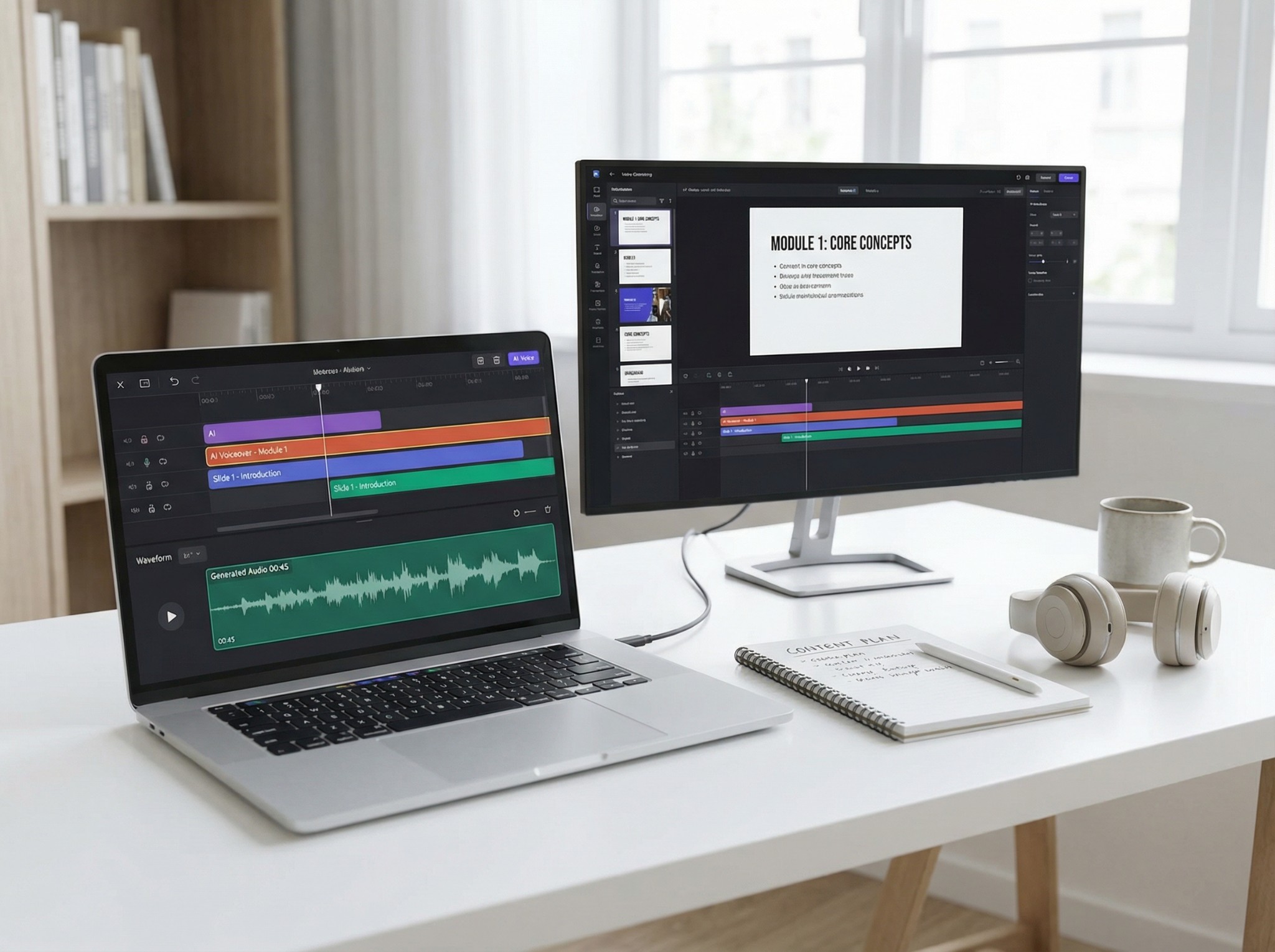
Murf.ai is a full voice production studio rather than a simple TTS tool — and that distinction matters. The interface uses a timeline editor. You can import scripts, assign voices, adjust pitch and speed by sentence, and export audio or video. The voice library has 200+ options across 40+ languages with styles ranging from conversational to newscast to promotional, and you can preview any voice against your own script before committing. Integrations with Canva, Google Slides, PowerPoint, and Zapier make it genuinely useful for content teams rather than just individual creators. The “Say It My Way” feature — where you can make the AI match your exact delivery — is on the Business plan, but even the base experience has enough control to produce clean, professional-sounding output.
Read the full Murf.ai review: https://thespeakr.com/murf-ai/
The free plan gives you 10 minutes of voice generation and 10 minutes of transcription — and it goes faster than you’d expect on a longer script. Crucially, you cannot download audio on the free plan at all; exports require at least the Creator tier. PDFs are also not supported for upload, only TXT, DOC, SRT, and VTT files, so OCR is off the table entirely. For someone who needs to occasionally generate a voiceover, the free plan is more of a demo than a working tool. But for teams producing e-learning content, presentations, or regular video narration, the production environment Murf offers is one of the more complete ones in this space.
It’s also worth noting that voice cloning is only available on Business and Enterprise plans. The free plan does not support audio downloads. API access requires separate pricing from Studio subscriptions.
- Pricing: Free (10-minute demo, no downloads); Creator $19/month (annual); Business $66/month (annual). API at $0.03/1,000 chars; Falcon at $0.01/minute.
- Best for: Content teams, e-learning professionals, corporate training, developers building real-time voice applications.
Comparison Table
The table below compares all ten platforms using the features that matter most to most users. This includes language support, free plans, pricing, and each tool’s strongest area.
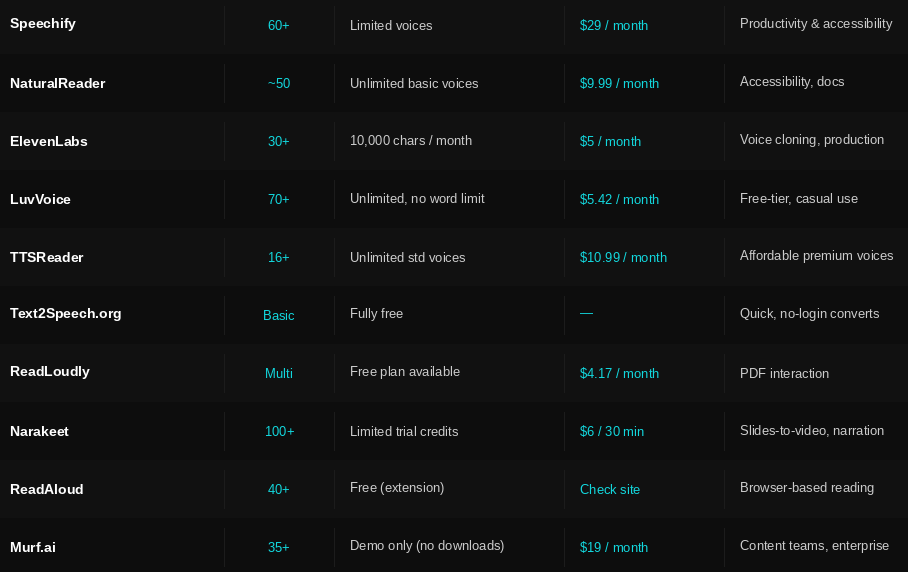
Pricing and features are subject to change — always verify current plans on each platform’s official website before making a decision.
TheSpeakr’s Closest Competitors
Of all the tools in this article, three overlap most directly with TheSpeakr. They focus on accessible TTS for documents, web pages, and everyday listening. They also offer fair and transparent pricing.
Speechify is the most obvious comparison. Both are built for people who prefer listening over reading. They support documents, PDFs, and web content. Both also offer mobile apps. The difference is scale and price: Speechify has a larger voice library and more polished cross-device sync, but its Reader Premium at $29/month is significantly more expensive than TheSpeakr’s approach of paying for what you actually use. For users who feel Speechify’s pricing is hard to justify, TheSpeakr is the natural alternative.
NaturalReader targets the same daily-listening audience and is the closest feature match — document uploads, web reading, OCR support, browser extension. The biggest difference is pricing. NaturalReader limits its free plan to basic voices, and its separate personal and commercial licenses add friction. TheSpeakr’s positioning around fair, character-based pricing is a direct answer to that kind of confusion.
ReadAloud competes for the same no-fuss, browser-based listening user. It’s free and easy to start using. However, the free voices sound basic, OCR is unavailable, and MP3 downloads require a paid plan. TheSpeakr’s OCR scanning and multi-format document support cover ground that ReadAloud doesn’t.
How to Choose the Right Solution
The ten tools above serve very different needs, so the best option depends on how you plan to use it.
- If you need to listen to content daily — Speechify and NaturalReader are built for this. Both handle documents, web pages, and PDFs across devices. Speechify offers more voices and cross-device sync; NaturalReader is more straightforward and generally less expensive.
- If voice quality and cloning matter most — ElevenLabs remains the benchmark for creative production and voice cloning. Its free tier is also one of the more useful starting points before committing to a paid plan.
- If budget is the priority — Luvvoice offers unlimited free conversions, 200+ voices, and no word limits. That makes it one of the most accessible TTS tools for users who don’t want a subscription. TTSReader’s free unlimited standard voices are another strong option.
- If you’re creating narrated video content — Narakeet’s presentation-to-video workflow is uniquely efficient for educators and corporate trainers. Murf.ai is the stronger choice if you need a full studio environment with collaboration tools and integrations.
- If you work with PDFs and documents — ReadLoudly offers more than standard TTS. Its “Chat with PDF” and flipbook features make it especially useful for research and studying.