ReadAloud.net Review 2026: A Hands-On Guide to Modern Text-to-Speech
ReadAloud.net is a widely used browser-based text-to-speech tool for web pages, PDFs, and articles. Its biggest advantage is simplicity: users can start listening within seconds directly inside the browser.
The platform is designed primarily as a lightweight read aloud utility rather than a full AI voice generation suite. That distinction becomes obvious once you compare it with newer AI-first platforms. ReadAloud.net performs well for quick article narration, accessibility support, and casual listening, but its limitations appear during longer sessions, scanned PDF workflows, and higher-quality narration tasks. The free tier relies heavily on basic browser-style voices, while premium features — including better AI voices, MP3 export, and expanded language support — sit behind daily usage limits.
In this article, we break down how ReadAloud.net works in practice, where its limitations start to appear, and how it compares to modern AI-powered text-to-speech platforms like NaturalReader, Speechify, ElevenLabs, and The Speakr across voice quality, OCR support, pricing, and long-form listening.
What is ReadAloud.net?
ReadAloud.net is a browser-based text-to-speech platform and Chrome extension for web pages, PDFs, and articles. It is designed for lightweight listening directly inside the browser, with minimal setup and no mandatory account creation.
The platform is most commonly used through its Chrome and Edge browser extension, which can read active web pages aloud directly from the current tab. Users can also paste text manually, upload supported documents, or open article URLs inside the web app. Its simplicity is a major reason the tool remains popular for accessibility support, casual listening, and quick long-form article consumption.
ReadAloud.net sits somewhere between traditional browser text-to-speech and newer AI-first narration platforms. It offers a faster and simpler workflow than tools built for professional voice generation, but its free-tier voices and document handling limitations become more noticeable when compared to modern AI-based platforms like ElevenLabs, Speechify, NaturalReader, or The Speakr.
How Modern Read Aloud Tools Work
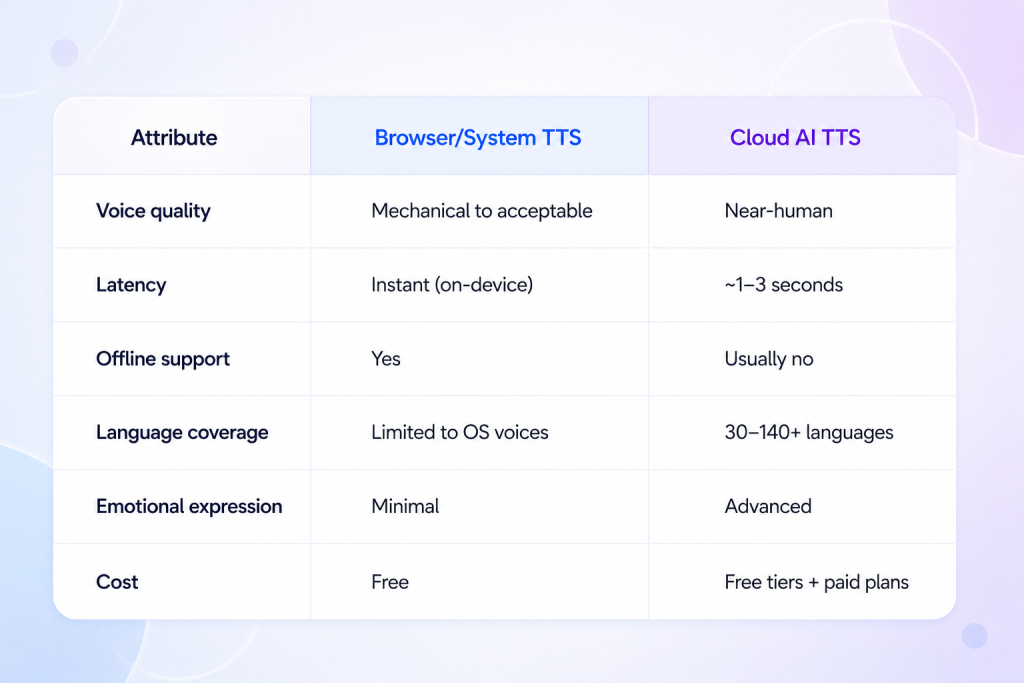
Modern read aloud tools generally rely on one of two approaches: built-in browser and operating-system text-to-speech, or cloud-based AI voice synthesis powered by neural speech models.
The voices built into Windows, macOS, ChromeOS, and modern browsers are designed primarily for accessibility and lightweight narration. They are fast, free, and work directly on-device, but most still sound noticeably synthetic during longer listening sessions.
Cloud AI voices work differently. Instead of relying on older operating-system speech engines, they generate audio using neural models trained on large datasets of human speech. That allows modern AI platforms to reproduce pacing, emphasis, conversational rhythm, and emotional tone far more naturally than traditional browser-based narration.
Why AI voices in 2026 sound different
ReadAloud.net still relies heavily on traditional browser and system-level speech engines, especially on its free tier. That approach keeps the platform lightweight and fast, but it also explains why the voices can sound flatter and more mechanical during longer listening sessions.
Newer AI-first platforms generate speech using cloud-based neural voice models trained on large datasets of human narration. The result is more natural pacing, cleaner emphasis, smoother sentence transitions, and less listening fatigue overall. That gap becomes especially noticeable when comparing ReadAloud.net to modern tools like ElevenLabs or The Speakr during long-form narration, research reading, or audiobook-style listening.
How We Evaluated ReadAloud.net
This review is based on hands-on testing conducted in May 2026 across Chrome and Microsoft Edge. We also compared ReadAloud.net against NaturalReader, Speechify, ElevenLabs, and The Speakr.
Testing included:
- text-based PDF playback
- scanned image-based PDF uploads to evaluate OCR behavior
- Wikipedia and web page URL extraction
- pasted long-form plaintext narration
- English, Spanish, and French voice testing
- free vs premium voice comparisons
- MP3 export restrictions
- Chrome extension workflows
- long-form listening sessions
- daily character limit testing
We also evaluated how ReadAloud.net performs during real extended listening rather than short demo clips. Part of this review focused specifically on usability, setup speed, browser accessibility, and listening fatigue, since ReadAloud.net positions itself primarily as a lightweight browser-based read aloud tool rather than a full AI voice production platform.
ReadAloud.net Pros and Cons
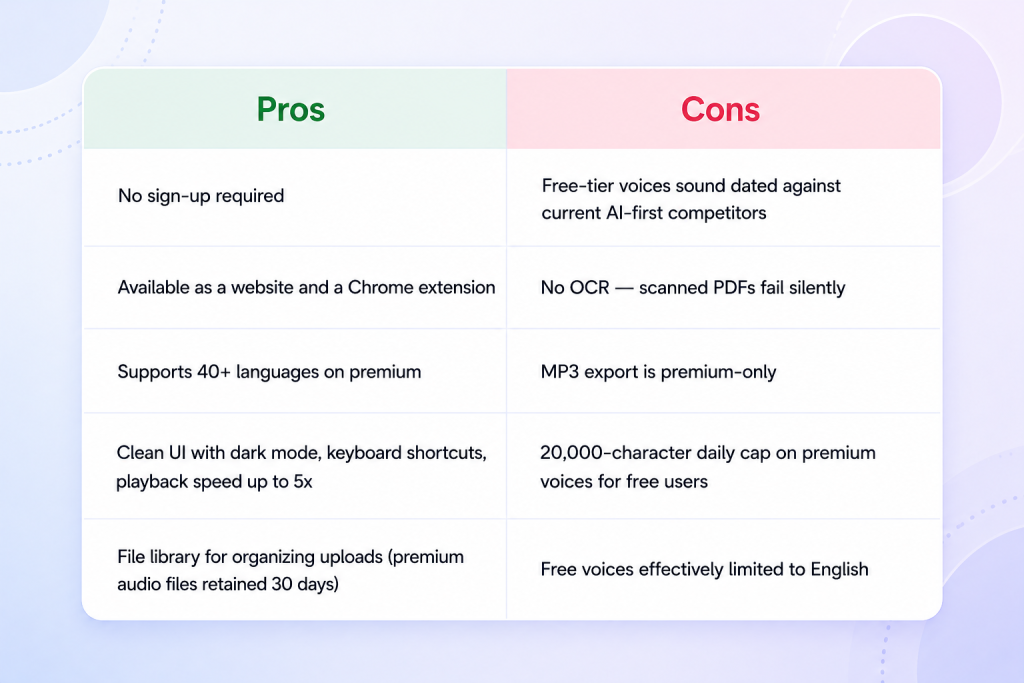
The table below summarizes where ReadAloud.net performs well for lightweight browser-based listening — and where newer AI-first text-to-speech platforms still hold a clear advantage.
What Makes a Read Aloud Voice Sound Natural?
Most text-to-speech reviews describe voices as “natural” without explaining what that actually means in practice. In reality, several different factors determine whether a read aloud tool feels comfortable during long listening sessions or becomes mentally tiring after a few minutes.
Five criteria consistently separate modern AI narration from older browser-based text-to-speech systems:
- Naturalness — Does the voice sound conversational, or does it still feel machine-generated?
- Prosody — Does the narration handle pauses, emphasis, sentence rhythm, and questions the way a human speaker naturally would?
- Multi-language consistency — Does voice quality remain strong across languages, or do non-English voices sound noticeably less refined?
- Latency — How quickly does playback begin after pressing “Play”? Delays longer than a few seconds interrupt listening flow.
- Customization — Can users independently control speaking speed, pitch, pronunciation, or emotional tone?
These factors matter together rather than individually. A voice can sound realistic at first but still become exhausting during long-form listening if pacing and prosody remain flat. Similarly, some platforms perform well in English but lose clarity or naturalness in multilingual workflows. The strongest read aloud tools in 2026 deliver consistent performance across all five categories rather than excelling in only one area.
ReadAloud.net Alternatives
ReadAloud.net is one option in a much broader text-to-speech market, and the right platform depends mostly on how heavily you use TTS and what kind of workflow you need. Browser-based tools focus on speed and simplicity, while newer AI-first platforms prioritize voice realism, OCR support, multilingual narration, and export workflows.
Microsoft Edge’s built-in read aloud feature remains the strongest built-in browser option because of its neural voices and clean reading interface, while Chrome’s Reading Mode works well for lightweight offline listening. Among standalone platforms, NaturalReader stands out for OCR and document-heavy workflows, Speechify focuses heavily on mobile and accessibility use cases, and TTSReader remains one of the simplest no-account browser tools available.
The biggest shift in the category comes from modern AI-first platforms like ElevenLabs and The Speakr. ElevenLabs currently delivers some of the most realistic AI narration available, especially for creators and voice production. The Speakr positions itself closer to long-form listening and productivity workflows, combining natural AI voices with OCR support, multilingual narration, adjustable mood and pitch controls, and a simpler workflow than traditional voice production platforms.
For readers exploring the broader market, our guide to the best text-to-speech tools in 2026 compares the leading platforms across voice quality, accessibility, OCR support, and content creation workflows.
Choosing the Right Tool for Your Workflow
- If you want the simplest browser-based read aloud tool
ReadAloud.net works well because it launches instantly, requires no mandatory sign-up, and integrates directly into Chrome and Edge through its browser extension. For casual article listening, quick accessibility support, and lightweight web narration, the platform remains one of the easiest options to start using immediately. - If you mainly read PDFs and long documents
ReadAloud.net performs reliably with text-based PDFs, articles, and pasted documents, but it does not support OCR for scanned files. If your workflow includes photographed documents, scanned textbooks, or older academic PDFs, tools like NaturalReader or The Speakr handle those formats more effectively. - If accessibility and listening comfort matter most
ReadAloud.net’s free voices remain usable for short sessions, but they become noticeably synthetic during extended listening. Users with dyslexia, ADHD, or reading fatigue may find modern AI-first tools like The Speakr, Speechify, or ElevenLabs more comfortable because of their more natural pacing and speech rhythm. - If you need multilingual narration
ReadAloud.net supports multiple languages, but most natural-sounding non-English voices sit behind the premium tier. During testing, Spanish and French premium voices were locked for free users, which makes the free version less useful for multilingual workflows. - If you create content or export audio regularly
ReadAloud.net supports MP3 downloads only on paid plans and is designed more for listening than production workflows. Users creating voiceovers, YouTube narration, or long-form AI audio generally benefit more from platforms like ElevenLabs or The Speakr, which offer stronger voice realism, export flexibility, and emotional voice controls.
How to Use Read Aloud Without Installing Extra Software
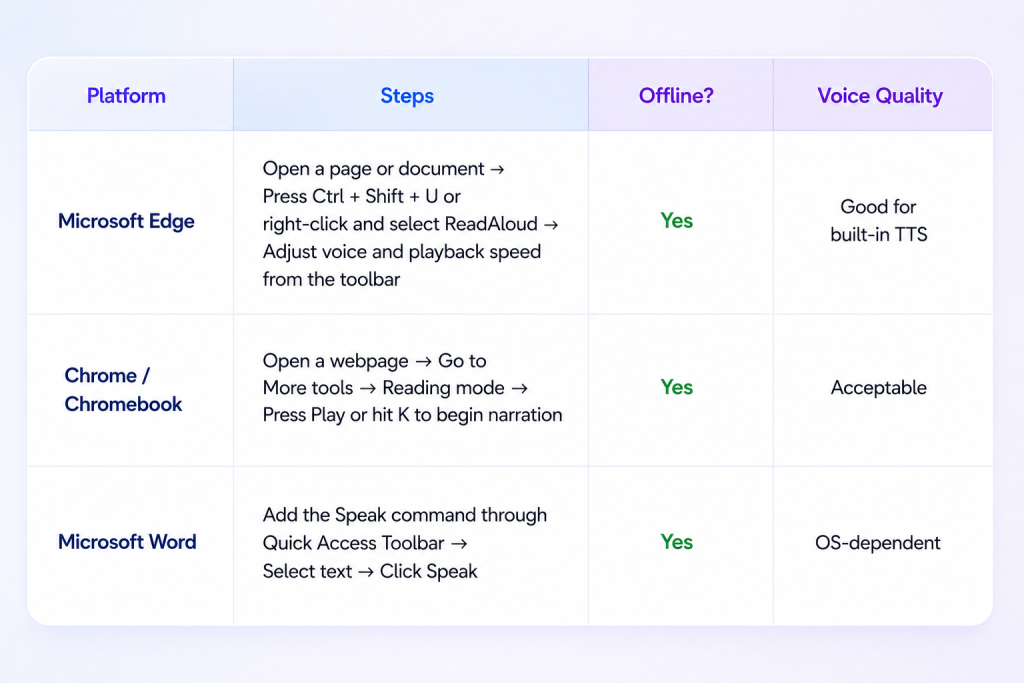
All three options work without creating an account or installing additional software. They rely on the voices already built into your operating system, which makes them fast and accessible, though noticeably less natural than modern AI voice platforms like ElevenLabs or The Speakr during extended listening sessions.
Accessibility and the Future of Read Aloud
Text-to-speech has become one of the most important accessibility technologies in modern computing. Read aloud tools help reduce reading fatigue and cognitive load for users with dyslexia, ADHD, low vision, and other reading-related challenges, which is why organizations like the International Dyslexia Association and the W3C increasingly recognize TTS as an important part of accessible content design.
What has changed most in 2026 is who uses these tools. Read aloud is no longer limited to accessibility workflows — modern AI voices have made long-form listening practical for students, researchers, professionals, language learners, and content creators. As voice quality improves, the line between accessibility software and everyday productivity tools continues to disappear.
Is ReadAloud.net Worth It?
ReadAloud.net remains one of the simplest ways to start using text-to-speech in a browser. The no-signup workflow, lightweight interface, and fast setup make it especially useful for casual listening, quick article narration, and basic accessibility support. Its limitations — synthetic free-tier voices, lack of OCR support, and daily premium voice limits — become more noticeable during long-form listening and document-heavy workflows, especially compared to newer AI-first platforms. Tools like ElevenLabs, Speechify, NaturalReader, and The Speakr increasingly offer more natural narration, stronger multilingual support, and better long-form listening experiences. Still, they also come with more complexity and higher pricing. Ultimately, ReadAloud.net works best as a fast, low-friction entry point into text-to-speech rather than a full AI narration platform.
FAQ
- What is ReadAloud.net?
ReadAloud.net is a browser-based text-to-speech platform and Chrome extension for web pages, PDFs, and articles. It converts written text into spoken audio using browser or cloud-based voices.
- Is ReadAloud.net free?
Yes. ReadAloud.net offers a free tier with four basic English voices and a 20,000-character daily premium-voice allowance. Native browser read-aloud features are entirely free. Premium AI voices and MP3 export typically require a paid plan.
- Does ReadAloud.net work without an account?
Yes. ReadAloud.net works without sign-up, though creating an account unlocks features like file libraries and device sync. Most browser-native read-aloud features also require no account.
- Can ReadAloud.net read PDFs?
Yes, but only text-based PDFs. Image-based or scanned PDFs require OCR, which ReadAloud.net does not currently support. Tools like NaturalReader and The Speakr include OCR for scanned documents.
- What is the daily character limit on ReadAloud.net?
Free users receive up to 20,000 characters per day on premium voices. After that, only the four basic free voices remain available until the next day.
- How many languages does ReadAloud.net support?
ReadAloud.net supports 40+ languages, but the free tier offers natural-sounding voices only in English. Other languages require a premium subscription.
- Can ReadAloud.net download audio as MP3?
MP3 export is a premium-only feature on ReadAloud.net. Free users can stream audio in the browser but cannot download it.
- What is the most natural-sounding read aloud tool?
The current generation of AI-first tools — including ElevenLabs and The Speakr — produces the most natural-sounding output. NaturalReader and Speechify also deliver high-quality voices on their premium tiers.
- Is ReadAloud.net safe to use?
ReadAloud.net is generally considered safe. It uses standard browser permissions, supports Google and Microsoft sign-in, and does not require access to personal files beyond what you upload.
- Does ReadAloud.net have a Chrome extension?
Yes. Multiple Chrome extensions named “ReadAloud” exist, including the official ReadAloud.net extension and a separate popular extension by another developer. Both work on most web pages.
- Can read aloud help with dyslexia?
Yes. Read aloud tools are widely used as accessibility aids for dyslexia, ADHD, and reading fatigue. They reduce cognitive load by replacing visual decoding with audio processing.
- What’s the difference between ReadAloud.net and a screen reader?
A screen reader (like NVDA or JAWS) narrates the entire interface for blind users. ReadAloud tools narrate only selected content for users who can see but prefer to listen.
- Does ReadAloud.net work offline?
ReadAloud.net requires an internet connection for premium AI voices, which are generated in the cloud. Native browser read-aloud features generally work offline using system voices.
- How do I read a web page aloud for free?
Use your browser’s built-in feature — Edge’s Read aloud (Ctrl+Shift+U), Chrome’s Reading Mode, or install a free extension. ReadAloud.net also works without sign-up directly in the browser.