ReadLoudly Review 2026: PDF to Audio, AI Chat, and the Limits
ReadLoudly sits somewhere between a PDF reader, a text-to-speech app, and an AI study assistant. Beyond basic TTS, the platform adds features like OCR for scanned PDFs, AI summaries, document chat, and eBook support, making it feel more like a productivity tool than a simple voice reader. After testing it across PDFs, scanned files, and long-form documents, we found that ReadLoudly does several things surprisingly well, especially around OCR and document interaction, though the Free plan is much more limited than the marketing initially suggests.
Overall, ReadLoudly is best suited for students, researchers, accessibility users, and anyone who regularly works with PDFs. It is less convincing for users focused mainly on studio-quality narration or unlimited audio generation, where tools like Speechify or ElevenLabs still have the edge.
In this article, we’ll break down how ReadLoudly works and what the Free and paid plans actually include. We’ll also explore how the credit system affects real-world usage and whether the platform is worth paying for in 2026.
What Is ReadLoudly?
ReadLoudly is a browser-based AI reading platform designed to turn documents into spoken audio.
You upload a PDF, EPUB, Word file, or image-based document, and ReadLoudly extracts the text before converting it into AI-generated speech.
In practice, ReadLoudly feels closer to a lightweight AI study workspace than a traditional audiobook-style reader.
The platform combines several tools inside one interface:
- PDF text-to-speech playback
- AI voice generation
- OCR for scanned documents and images
- AI summaries
- Chat-with-PDF functionality
- eBook support (EPUB, MOBI, AZW3)
- File conversion tools
Instead of just converting text into audio, ReadLoudly tries to help users interact with the document itself. Students can generate quiz questions from class notes. Researchers can summarize long papers. Accessibility users can listen to scanned PDFs that normally break standard TTS tools.
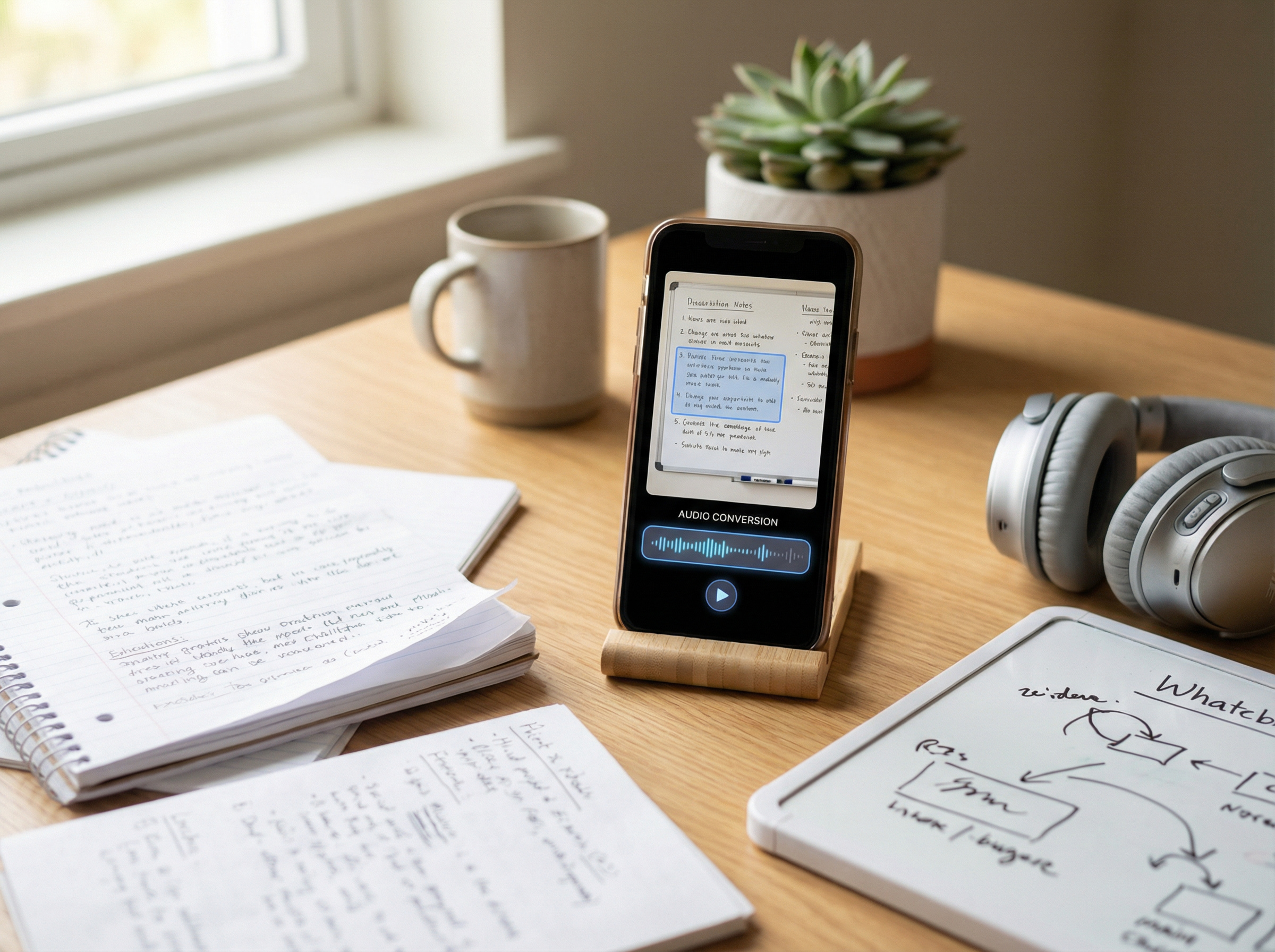
The platform also supports image-based reading through its OCR-powered Image Reader, which turned out to be one of the strongest parts of the experience during testing.
How We Tested ReadLoudly
We tested ReadLoudly in early 2026 across desktop and mobile browsers to evaluate both features and real-world usability. Instead of focusing only on simple PDFs, we tested scanned documents, formatting-heavy pages, and long-form reading workflows where lightweight TTS tools often struggle.
During testing, we uploaded:
- standard text-based PDFs
- scanned image PDFs
- EPUB books and MOBI files
- long-form articles and screenshots with embedded text
We also compared the two Free voices alongside one Standard paid voice and one Natural premium voice to better understand the real difference between the tiers. Testing included AI summaries, Chat-with-PDF sessions, OCR extraction, playback controls, mobile browser usage, and export workflows. Most sessions lasted between 20 and 30 minutes.
Importantly, we have no affiliate or financial relationship with ReadLoudly. That matters because many AI reading tools are reviewed through heavily affiliate-driven content ecosystems, where real limitations are often softened or ignored entirely.
ReadLoudly Free Plan
One of the biggest reasons people search for ReadLoudly is simple: “Is it actually free?” Technically, yes — but the Free plan feels more like a permanent demo than a full reading platform. You can upload documents, test OCR tools, and try the AI features, but the biggest limitations appear quickly once you start using the platform regularly.
The biggest surprise is the voice library. While ReadLoudly advertises 50+ voices overall, Free users only get access to a couple of basic English voices, and they sound noticeably more robotic than the paid Natural voices. MP3 export is also locked behind paid plans, which means Free users can stream audio inside the platform but cannot actually download it.
The AI features are heavily restricted as well. Free users get:
- 5 chat-with-PDF messages per day
- 3 AI summaries per month
- 50MB uploads
- roughly 10-page processing chunks
- automatic file deletion after 30 days
That may sound reasonable at first, but the limits disappear quickly during active study or research sessions. Follow-up chat questions count separately, which makes the cap feel even smaller. Where ReadLoudly deserves real credit is OCR. Unlike many free TTS tools, the platform includes its Image Reader on the Free plan. Users can upload scanned PDFs, screenshots, and image-based documents while still extracting readable text. That alone makes the Free version more useful than many competitors, even if the Core plan feels like the real starting point for consistent use.
ReadLoudly’s Credit Math
ReadLoudly’s pricing looks inexpensive at first glance, with Core starting at $5/month and Pro at $19/month. The more important detail is that the platform uses a credit system rather than unlimited voice generation. Core includes 100,000 monthly credits, while Pro raises that to 400,000, but Natural voices consume credits far faster than Standard voices. In practice, premium voices cost roughly four times more, which significantly changes how much audio you can realistically generate each month. That means the platform feels affordable for occasional listening and study workflows, but heavier users will need to pay closer attention to how quickly credits disappear.
Estimated Monthly Audio Output
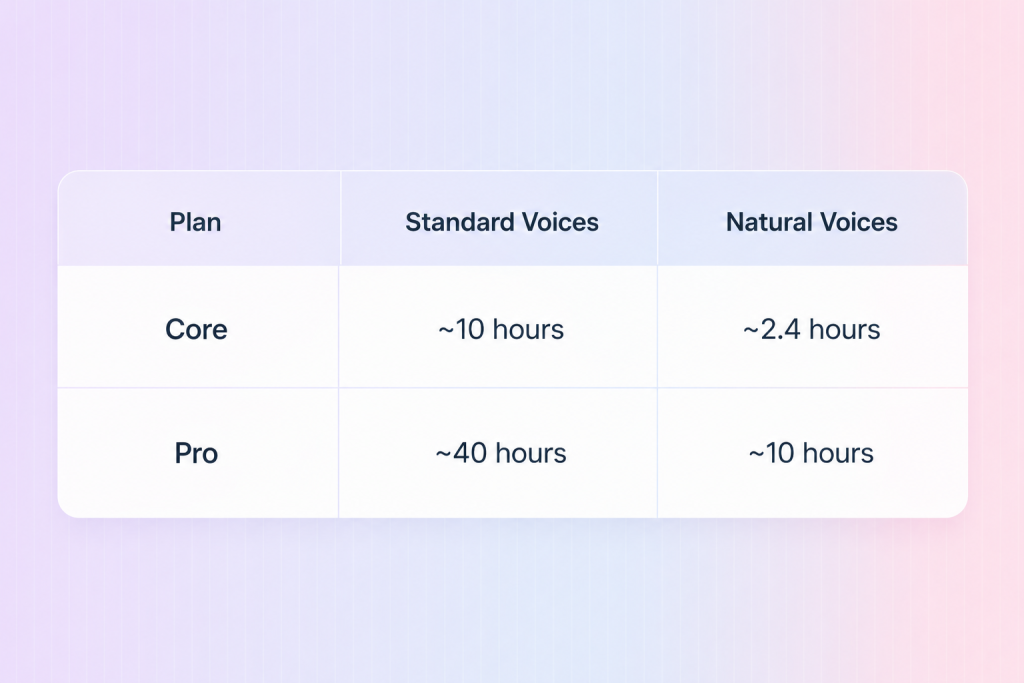
The difference becomes much more noticeable during long reading sessions. If you mainly listen to PDFs while multitasking, Standard voices are usually good enough. They sound slightly robotic, but still clear and easy to follow. Natural voices sound significantly smoother and more human, especially during long-form listening, but they also consume credits much faster. That trade-off makes ReadLoudly feel more optimized for studying and document productivity than for unlimited audiobook-style listening.
The good news is that the pricing itself remains relatively transparent compared to many AI voice platforms. The less good news is that some users may assume the Pro plan is effectively unlimited when it is still usage-based. That does not make the pricing bad, but it does change who the platform works best for and how heavily you can realistically use premium voices each month.
Chat-with-PDF: ReadLoudly’s Biggest Advantage
Most TTS platforms stop at simple audio playback. ReadLoudly goes further by letting users interact with documents through AI, and during testing, that feature ended up being more useful than we expected. After uploading a document, users can ask questions directly inside the interface, including prompts like:
- “Summarize this section”
- “Explain this concept more simply”
- “Generate quiz questions”
- “What are the key conclusions?”
For students, the experience feels surprisingly close to having a lightweight AI tutor attached to a PDF. For researchers or professionals, it works more like a fast document-navigation tool. It helps surface important information without manually scanning hundreds of pages. The platform can also reference specific details from the document instead of giving generic responses, which makes it feel more focused than simply uploading a PDF into ChatGPT.
The limits still matter, though. Free users only get 5 chat messages per day, while Core raises that to 25 and Pro removes most practical restrictions. In our testing, the feature worked best with textbooks, lecture notes, research papers, reports, and study guides. It struggled more with extremely long documents, heavily visual PDFs, poorly scanned text, and complex tables. Like every AI tool, hallucinations still happen occasionally, especially with more interpretive prompts, though factual questions were generally handled well.
This ultimately feels like the feature that gives ReadLoudly its strongest identity. Without it, the platform would feel like another browser-based TTS tool. With it, ReadLoudly starts feeling much closer to an AI-assisted reading and study workspace.
OCR & Scanned PDFs
This ended up being one of the strongest parts of the platform. Many TTS tools struggle with scanned PDFs because the document is technically an image rather than selectable text, so the software cannot properly detect what should be read aloud. ReadLoudly handles this through its built-in Image Reader, which uses OCR to extract text before converting it into speech.
The platform supports a wide range of image and document formats, including JPG, PNG, GIF, BMP, WEBP, TIFF, and scanned PDFs, allowing users to extract text from image-based files before converting them into speech.
During testing, scanned newspaper pages and photographed textbook sections worked far better than expected. The OCR was not perfect, but it was accurate enough that the audio remained understandable, even when the original scan quality was inconsistent. That matters because accessibility users and students often work with imperfect scans, screenshots, or older PDFs that many lightweight TTS tools fail to process correctly.
Compared to competitors, this becomes a real differentiator.
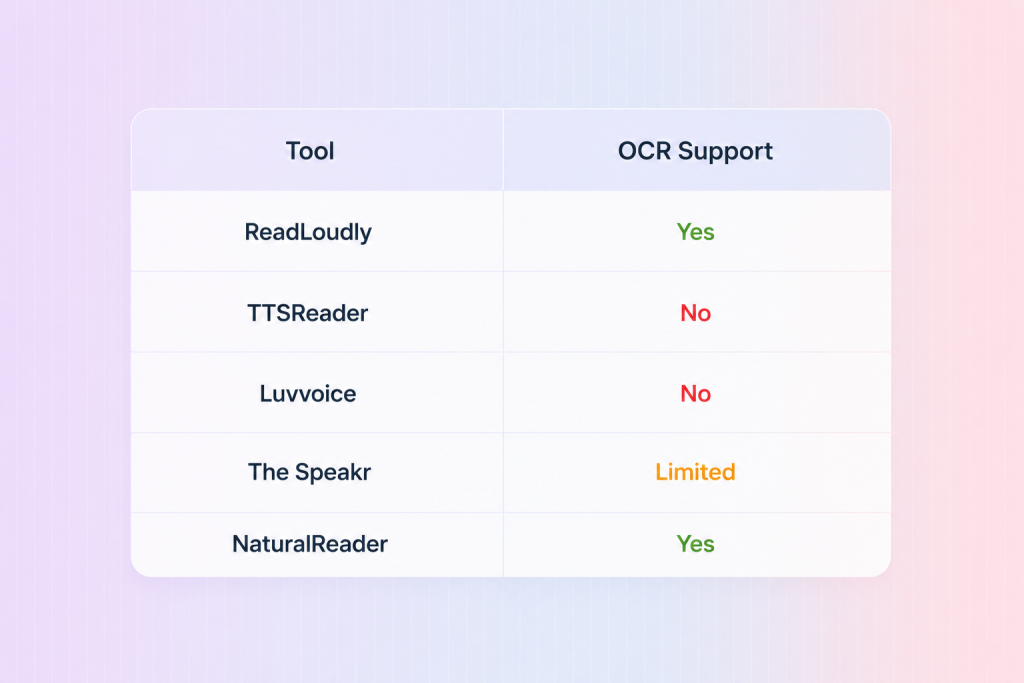
This is also one of the few genuinely useful Free-plan features. While many platforms place OCR behind paid tiers, ReadLoudly includes it immediately, which makes the Free version much more practical than it initially appears.
ReadLoudly Pricing
ReadLoudly keeps its pricing structure relatively simple. That is refreshing in a category where many AI tools hide important usage limits behind support pages and fine print.
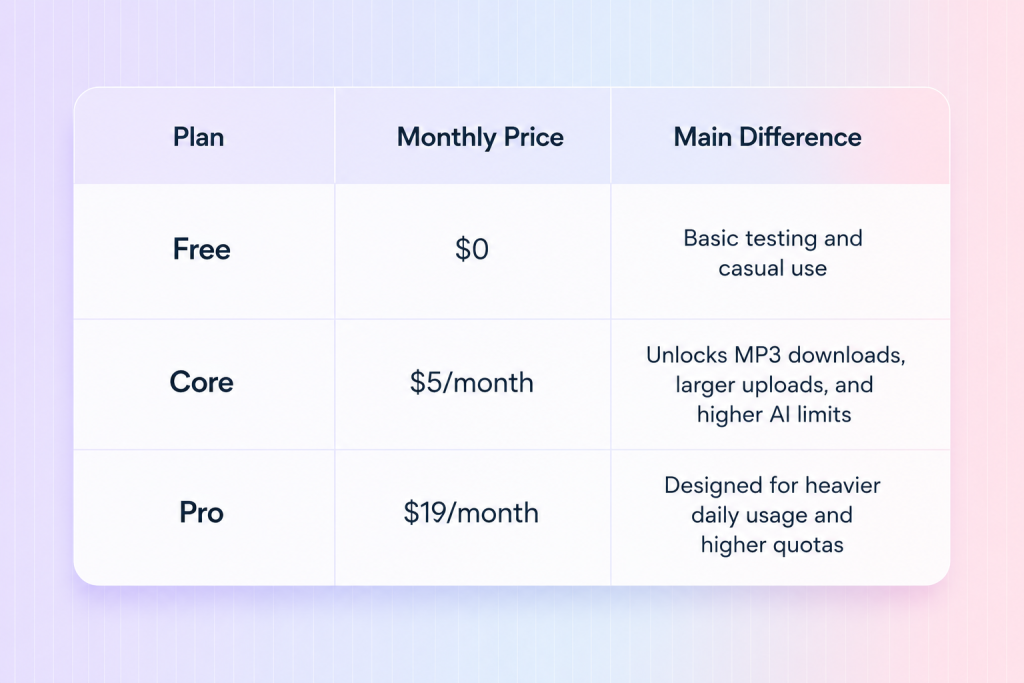
Annual billing lowers the effective monthly price to roughly $4.17/month for Core and $15.83/month for Pro, and students or educators can reduce that even further through the platform’s 50% discount. That makes the Core plan especially competitive for academic use.
For most users, Core feels like the real sweet spot because it unlocks the features that make ReadLoudly significantly more practical for everyday use, including MP3 downloads, larger uploads, higher AI limits, additional voices, and ad-free listening.
Pro mainly makes sense for heavier daily workflows. If you are not constantly generating audio or relying heavily on summaries and Chat-with-PDF features, Core is probably enough for regular use.
ReadLoudly Pros and Cons
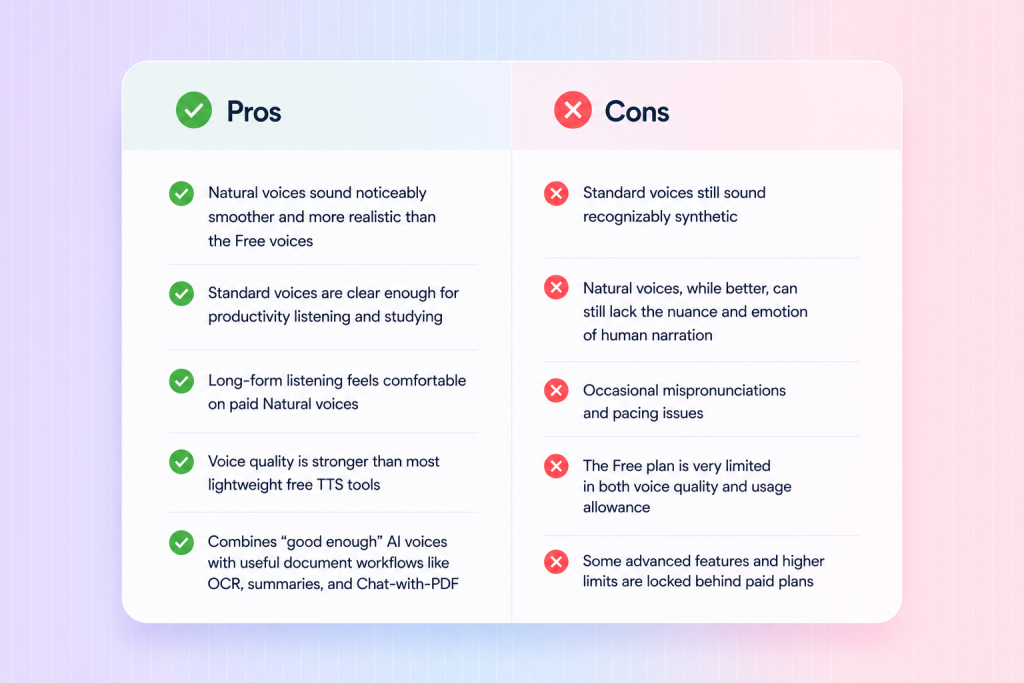
Overall, ReadLoudly’s strengths are less about pure voice realism and more about how effectively it combines AI reading, OCR, and document workflows in one platform.
ReadLoudly occupies an interesting position in the market by combining text-to-speech, OCR, AI summaries, and document chat inside a single platform. For readers comparing broader alternatives, our guide to the best text-to-speech tools in 2026 explores how platforms like Speechify, ElevenLabs, NaturalReader, and other leading solutions compare across accessibility, voice quality, and productivity workflows.
Is ReadLoudly Worth It?
ReadLoudly is worth it for students, researchers, and accessibility users who regularly work with PDFs and want more than basic text-to-speech. The platform combines TTS, OCR, AI summaries, document chat, and eBook support in one affordable interface. That makes it especially useful for studying and document-heavy workflows. The Free plan is fairly limited, and Natural voices consume credits quickly, but the Core plan offers solid value for most users. ReadLoudly is less ideal for professional voice production or unlimited audiobook-style listening, where tools like ElevenLabs or Speechify still perform better.
FAQ
- Is ReadLoudly free?
Yes. ReadLoudly offers a Free plan with basic text-to-speech, OCR support, 5 chat-with-PDF messages per day, 3 AI summaries per month, and 50MB uploads. However, Free users only get two voices, no MP3 downloads, and uploaded files auto-delete after 30 days.
- How much does ReadLoudly cost?
ReadLoudly Core costs $5/month or $50/year, while Pro costs $19/month or $190/year. Students and educators can also claim a 50% discount on paid plans.
- What’s the difference between Core and Pro?
Core includes 100K credits per month, 25 chat messages per day, and 200MB uploads. Pro increases this to 400K credits, unlimited chat, 50 summaries per day, and 500MB uploads for heavier workflows.
- Does ReadLoudly support OCR?
Yes. ReadLoudly includes OCR through its Image Reader, allowing users to extract text from scanned PDFs and image files like JPG, PNG, WEBP, and TIFF — even on the Free plan.
- Can I download MP3 files on the Free plan?
No. Free users can only stream audio inside the browser. MP3 downloads are only available on Core and Pro plans.
- What is Chat-with-PDF?
Chat-with-PDF lets users ask questions about uploaded documents, generate summaries, explain concepts, create quizzes, and pull information directly from the text. It’s one of ReadLoudly’s biggest differentiators compared to basic TTS tools.
- What file formats does ReadLoudly support?
ReadLoudly supports a wide range of formats, including PDFs, DOC and DOCX files, EPUBs, MOBI, AZW3, HTML, RTF, FB2, and CBZ. It also supports scanned image formats such as JPG, PNG, GIF, BMP, WEBP, and TIFF through its OCR-powered Image Reader.
- Does ReadLoudly have a mobile app?
No. At the time of testing, ReadLoudly is entirely browser-based and does not offer native iOS or Android apps.
- Can Pro users still run out of credits?
Yes. Pro is still usage-based rather than unlimited. Natural voices consume credits much faster than Standard voices, so heavy users can still hit monthly limits.
- Is ReadLoudly worth it?
For students, researchers, accessibility users, and people who regularly work with PDFs, ReadLoudly offers strong value — especially because it combines TTS, OCR, AI summaries, and document chat in one platform. Users focused mainly on ultra-realistic narration or unlimited listening may still prefer tools like Speechify or ElevenLabs.